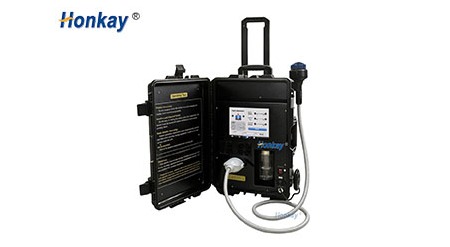
A demo happens in a room that is not yours, on a machine that is not the one you will receive, in front of someone who has run it a hundred times. The case is open on the floor, the handpiece is already warm because the rep has been demonstrating since nine o'clock, and everything on the table is arranged to make the platform look finished rather than to help you find out whether it suits the room you are standing in.
Thirty minutes is enough to settle the physical questions, provided the half hour runs in a fixed order and gets written down as it goes. The usual mistake is not asking too few questions; it is asking everything at once, at the end, while the rep packs up, and then reconstructing the answers from memory in the car. Memory rounds a gritty cable gland into "fine" and a hot nose into "warm".
What follows is a printable sequence for that half hour, with the pass condition stated for each check so two people watching the same demo would write the same note. It covers the packing list against the box, the handpiece in a gloved hand, the console under a thumb, noise measured rather than remembered, what the sound does as the level steps up, the heat story after twenty minutes, the counter, the sample case, and the paperwork to ask for while the unit is still warm. All of it is hardware and purchasing. Which client is suitable for a session, and what a session contains, stays with the trained operator working under the clinic's own protocol.
The unit on the table has travelled in a padded case, been assembled and packed away repeatedly, and run long enough that any cold-start quirk has passed. That is what a demonstration is, not a deception. The consequence is that a demo is excellent at questions of geometry, response and feel, and poor at questions about what the platform is like after a hundred sessions. Sorting your questions into those two piles before you arrive is the most useful preparation available.
Geometry is immediate. Where does the cable leave the handpiece, and does it cross the client when you stand on the far side of the couch? How far does your thumb travel to change a level while your other hand holds the head against a shoulder? Does the cradle carry the housing, or hang the weight off the cable? These need no second visit and cannot be read off a specification sheet, which is precisely why they are worth the trip.
Lifecycle is not. Whether a fan bearing starts to whine in month eight, whether the cable survives being coiled the same way four times a day, whether a replacement head arrives in one week or six — those are questions about a supply chain, and the demo is where you collect documents and commitments rather than where you test them.
| Question you arrived with | Settled on the day? | How to settle it | If it cannot be settled |
|---|---|---|---|
| Does the handpiece suit my grip for a full list? | Yes, fully | Five unbroken minutes, gloved, in the working position | Nothing — this is what the visit is for |
| Is the console quick enough mid-session? | Yes, first attempt | Count and time the taps, gloved, at working height | Request video of a production unit doing it |
| How loud is it with a client in the room? | Partly — measurable, not comparable | Fixed-distance reading, same app as your current unit | Compare numbers, never adjectives |
| Does it hold steady over a long list? | Partly — one window only | Start a continuous run early, check heat at the end | Duty cycle in writing, plus two clinic references |
| What happens when a cable fails? | No | See the parts list and each price before leaving | Do not order until a priced list arrives |
| Will it behave the same in a year? | No | Nothing on the day proves it | References, warranty text, a number you can telephone |
Worth saying before the clock starts: the picture you were sent and the object on the table are different documents. A sales image is composed — lit from one side, cables dressed out of frame, heads spaced evenly in the cradle, background white so nothing competes. It is good for recognising the platform and no help at all in judging it, because the three things you need to see are exactly what composition removes: where the cables go, how the accessories are stored, and what the back panel looks like.

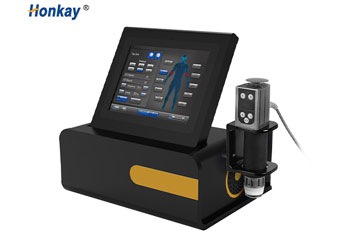
The image above is that kind of document. It shows four applicator positions along the right edge, so the platform expects to hold more than one head at a time; handpieces in cradles on the top plate, so the cables leave the housing upwards; a screen angled back rather than flat. It withholds how much cable appears before it drops behind the unit, whether the applicator row is rigid or a fabric pouch, and what the connections look like from behind. Those gaps are what the site visit fills.
Ask, before anything is switched on, for the unit to be taken out of its case in front of you rather than presented already assembled. It changes the character of the visit: you see how it is packed, what sits on top of what, and how many separate bags there are. It also gives you four minutes of the rep's attention before the sales conversation starts.
Lay every item out in the order it comes out and count against the quotation and the packing list, not against the rep's description. The quotation names the platform and the heads and then says "standard accessories", a phrase that means whatever the factory decided that month. You are not looking for generosity but for completeness: the pieces without which the unit cannot run on the first morning, and the pieces that are cheap to include now and expensive to ship alone in three months.
The items that go missing are dull and predictable. A second handpiece cable, so one failure does not take the room out of service. The coupling gel, or a statement of which gel the supplier approves. A foot switch, where the platform is meant to be used with both hands busy. Fuses in the rating the unit actually uses. A tool for changing a head or a membrane. The manual in the language of the people who will operate it. Case keys, which sound trivial until the case is locked and the keys are in another country. Photograph the open case with the packing list beside it, and write down the serial numbers of the platform and every handpiece.
| Count on the table | What the quote implies | What "short" looks like | Cost of finding out later | Note to take |
|---|---|---|---|---|
| Platform and mains lead | One unit, one lead, correct plug | Wrong plug, or a captive lead | A local electrician on day one | Serial, plug type |
| Handpieces and cables | One cable per head quoted | Fewer cables than heads | Air freight per cable exceeds its price | Head numbers, cable count |
| Applicator inserts | "A full set" | Two working profiles, five decorative | Single-unit prices for the missing shape | Photograph the row |
| Couplant | Starter bottle or named product | Unlabelled bottle you cannot reorder | Weeks of trial with local gels | Product name in writing |
| Foot switch | Optional, quietly dropped | No switch, no socket | One-handed operation for years | Does the socket exist |
| Manual, fuses, tools | Manual in English, service sheet | Wrong language, PDF promised later | Training by demonstration only | Language, page count |
| Case and foam inserts | Cut foam for the set | Foam fits the unit, not the heads | Heads damaged in transit | Photo packed and closed |
The point of the count is not to catch the rep out. The accessories are the cheapest part of the order and the most expensive part of ownership, because they are what you will reorder alone, in a hurry, with a client already booked.
Put a glove on before you pick the handpiece up. A glove changes the diameter you can close around, the friction between palm and housing, and whether a button answers to a knuckle or needs a bare fingertip. Half the complaints about a control layout come from people who tried it with a bare hand in a showroom and met it again in a clinic wearing nitrile.
Hold the head the way you would hold it against a shoulder, not the way you would hold it to admire it. Three things appear within a minute. Where your thumb lands relative to the controls, and whether reaching them costs you a regrip. Whether the housing has a flat or a swell under the palm, because a smooth cylinder looks tidy and slides in a gloved hand. And the balance point: a nose-heavy head has to be held up, a handle-heavy one held down, and neither is free over a long list.
Then follow the cable with your eyes and with your hand. The question is not whether it is thick but where it goes when the head is on a client lying on a couch and you are standing on the far side. Does it drape across their body, or fall away behind your forearm? Does the gland hold it off the skin, or point straight down so it rests on the client's leg for the session? Bend it at the gland and feel how much of the bend the strain relief takes. Then coil it once, the way it will be coiled every evening, and see whether it keeps that shape or fights back.
Watch how the head sits in its cradle, because that is where it lives. A cradle that supports the housing is doing its job. One that lets the head hang from the cable loads the gland every idle hour, and the gland is exactly where these cables fail. Lift and replace it with one hand, as you would between two areas of the same session. If that takes two hands and a look, it will be done badly four times a day for three years.

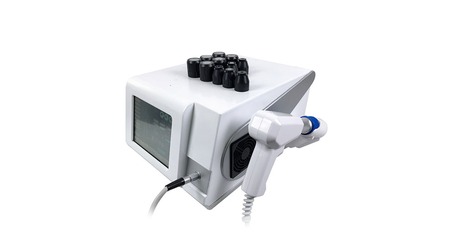
The picture above matters for one reason: the controls are on the handpiece, not only on the console. That is a real design choice with a real consequence. If the buttons sit under your thumb you can change a level without looking away from the client, which is the whole argument for putting them there. If they are stiff, small or placed where a gloved thumb cannot find them without a glance, the handpiece controls are decoration and every adjustment happens at the console anyway — in which case you have paid for a feature you will not use, and the demo is where to find that out.
Test them the hard way. With the head on a gel pad and your eyes on the pad, step the level up by one and back down by one. If you cannot do it blind, say so out loud and write it down. Then do the same with your eyes on the display, which is how a cautious operator will do it at first, and count the presses per step. A control that moves two levels per press, or needs a long press to repeat, will be operated differently by different staff, and that is how two people in one room end up running the same platform in two different ways.
| Aspect | What to do | Pass | Marginal | Fail |
|---|---|---|---|---|
| Grip with a glove | Close your hand and hold two minutes | Fingers wrap without pressing | Smallest fingers cannot reach the body | You squeeze to stop it rotating |
| Control reach | Change one level blind, head on a pad | One press per step, confirmed by feel | Found by feel, needs a glance to confirm | Regrip, wrist turn or second hand |
| Weight and balance | Hold in the working position for five minutes | Neutral, no sense of lifting or pressing | Nose-heavy but manageable | Forearm ache, head tips out of contact |
| Cable exit angle | Stand where you would really stand | Falls away, crosses nothing | Touches the client but stays still | Lies across the client or drags |
| Gland and relief | Bend to its limit at the housing | Relief takes the bend early | Short rigid section below the gland | Cable kinks or gland turns in its seat |
| Cradle return | Out and back with one hand, no looking | Seats itself, holds the housing | Needs a glance, then seats | Hangs from the cable or jams |
| Head change, gel on gloves | Swap one insert mid-demo, gloves wet | Quarter turn or push and click | Works after a wipe | Needs a tool or clean gloves |
At minute nine, ask for a continuous run at a mid setting and note the time on your own phone. This is the most useful thing you can do in the half hour, because it turns the rest of the visit into a heat test running in the background. Do not let it be interrupted for the checks that follow: a handpiece set down every two minutes never warms up, and the point is to see what twenty minutes of continuous work does to it.
While it runs, use the console the way a busy operator uses it. Screens age faster in daily service than electronics do, not because they fail but because the interaction is judged a thousand times a week. Put a gloved finger on a value and count the taps to change it, whether the number moves on the first press or the second, and whether the display ever shows the old value for a moment afterwards. Latency of a fraction of a second is invisible in a demo and maddening in a session, because the operator presses again and the setting moves two steps.
Then look at the screen from where you will actually stand. Most consoles are photographed straight on and used at an angle, in a lit room, by someone leaning over a couch. Tilt to the height of an operator standing at the couch and check whether the values stay readable and whether the brightness survives daylight.

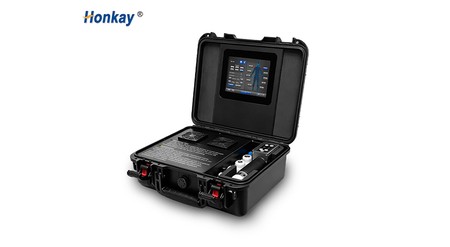
The screens above show the two things a demo should make you count: fields and taps. Fields matter because every value on the display is a decision somebody makes before the platform does anything, and six fields at once will be set up six different ways by six members of staff. Taps matter because the distance between wanting a change and getting one is the distance between an operator who watches the client and an operator who watches the screen. Count the values visible in the centre panel, then count the presses to change one of them. More than three for something you would touch mid-session is worth a question about a shortcut.
Power the unit down once, deliberately, and time the boot. Switch off at the mains, wait, switch back on, and watch whether it returns in the state it went down in or starts from defaults. A slow boot is not a fault; a slow boot that also loses settings is a routine you will perform in front of a client.
Now the noise, which carries more diagnostic information in its character than in its volume. Measure it before you judge it, because the ear is a poor recorder. A phone sound-level app at a fixed distance — arm's length from the head, at the operator's ear height — gives you a number to write down and compare with your current unit measured the same way, in the same room, with the same app. That comparison is worth more than any adjective, and it takes ninety seconds. Treat the figure as a comparison, never as a specification.
Take three readings: head in the air, head on a gel pad on the table, head on a pad held against a forearm. The air reading is the drive alone. The pad reading adds the sound of the pulse entering a medium, which is what your client hears most clearly. The forearm reading is what the room sounds like, and is usually the quietest, because contact damps the housing. If the forearm reading is louder than the pad reading, something is loose or resonating.
Vibration needs a different sense. Rest two fingers on the housing while it runs, then on the cradle, then on the table beside it. A well-isolated handpiece should feel like a pulse in your hand and almost nothing in the table. A buzzing tabletop means the energy is going somewhere it should not, and over a long list that is a complaint from the next room as much as a comfort problem. Then hold the cable loosely a hand's width from the gland: a sharp tick travelling back into your fingers is vibration reaching the connector, which is how a conductor breaks inside a gland that still looks healthy.
| Console check | How to run it | Passing | Warning | Ask on the spot |
|---|---|---|---|---|
| Touch with a glove | Press a value once | Registers first press | Needs repeating, jumps two | Is there a glove mode |
| Taps per change | Rep changes frequency, then energy | One tap from the running screen | Submenu or a warning to dismiss | Two storable presets? |
| Readability at height | Stand at the couch in room light | Legible at arm's length | Glare, or only readable head-on | Does the angle lock? |
| Power cycle | Off at mains, wait, on; time it | Returns with its settings | Defaults, or first touch ignored | Any need for a second attempt? |
| Output selection | Switch channels, run each briefly | Clean selection, clearly named | Unclear, or keeps the old value | Settings per channel or shared? |
| Fault behaviour | Ask what an unplugged head does | Clear message, output stopped | Silent stop, power cycle needed | Which faults clear without service |
| Where you listen or feel | Should be like | Bad version is like | One-line record |
|---|---|---|---|
| Head in air, at ear height | Dry even tap, steady rhythm, no hiss | Rattle over the tap, hiss between pulses | Reading plus "clean" or "rattle" |
| Head on a pad on the table | Softer tap, identical pulse to pulse | Knock changes within a few pulses | Reading plus "even" or not |
| Head on a forearm | Quieter than the pad reading | Louder than the pad reading | Lower or higher than the pad |
| Fingers on housing and cradle | Pulse in the housing, nothing in the cradle | Cradle buzzes, panels tick | Order in which surfaces carried it |
| Cable near the gland | A faint pulse you must concentrate on | Sharp tick up the cable, cable stiffens | Faint, noticeable or sharp |
| Table and floor | Nothing at a metre | Hum in the tabletop, feet walking | Silent, audible or felt |
A handpiece does not simply get louder as the setting rises. What changes is the relationship between the rate of the pulses and the weight of each one, and the two do not move together. Step up one notch at a time and you should hear the same clean tap, arriving faster or harder, keeping its shape. What you should not hear is a second sound on top of it — a flutter, a scrape, a short buzz hanging under the pulse. That second sound is usually mechanical, and it is the earliest audible sign that something inside the head is not tracking as it should.
Run the ladder properly. Start at the lowest working setting, run twenty seconds, note the character in one word, step up, repeat. Keep the head in the same place each time — on a gel pad on the table is fairest, because it repeats and involves nobody. Listen for the step at which the sound stops being the same event at higher intensity and starts being a different event, and note that step number. If the change arrives at the second of five levels, the usable part of the range is narrow and every operator will be working at its edge.
Then repeat the ladder once against a forearm, because contact changes the acoustics and because that is the condition the sound will be judged in. A handpiece that sounds healthy in air and rough under contact is telling you the housing resonates under load. If the two ladders disagree, trust the contact one; nobody uses the platform in mid-air.

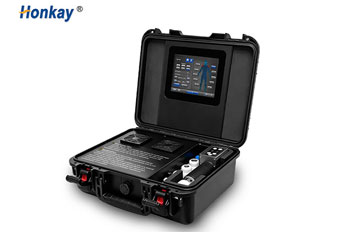
Those three insets are why the channel question matters. They show three separate places on one cabinet where an output connects, each with its own hardware behind it, and a demo will almost always run the position the rep is most comfortable with. Your impression of the whole machine then rests on one third of it. Make the rep run each position for a minute and write one line for each. If one is clearly worse and that is the one your room needs, you have learned something no brochure would tell you.
| Step | What you should hear | Cable should | Red flag | Note |
|---|---|---|---|---|
| Lowest setting | Soft tap with clear gaps | Hang loose, no twitch | Uneven gaps, missed pulses | Even or not |
| First step | Same tap, faster or firmer | Small movement, settles | New tick, housing rings | Character or intensity |
| Middle of range | One sound, denser, no flutter | Steady tremble, unseen | Scrape, wandering pitch | Describe carefully |
| Upper usable step | Harder, still one event | More movement, no crease | Sound splits, rattle lingers | Where it changed |
| Top of range | Loud, fast, still countable | Visible pulse, calm gland | Uncountable, hot insulation smell | Would anyone accept it |
| Back down | Same sounds in reverse | Loose again | Rattle persists, meaning heat | Returned to baseline? |
The continuous run has been going for about fifteen minutes and the handpiece has worked through most of the demo. This is the only moment when you can feel something a cold unit never shows. Take your gloves off and use the back of your fingers, which is more sensitive than the palm. Feel, in order: the housing at mid-body, the nose where the head sits, the cable a hand's width behind the gland, the exhaust grille, and the case surface under the cradle.
You are looking for a pattern, not a number. Evenly warm across the body is normal. Hot at the nose and cool at the back means energy is going somewhere it should not, and the usual cause is contact rather than electronics. Hot along the whole body means a heat path back into the operator's hand, which matters because that hand is holding it for a living. Warm at the gland is the one to watch, because the conductor is thinnest there and a hot spot becomes a break.
If the handpiece displays its own temperature, compare the number with your hand. The reading is a sensor on a board; your hand is a sensor on a surface. If the display says warm and the handle feels hot, the sensor is not where the heat is. Note both and ask where the sensor sits — a fair question with a simple answer, and a rep who can answer it has been inside the unit.
Listen to the fan while you are back there. A fan at constant speed is doing simple cooling; one that steps up after several minutes is following a temperature and is likelier to stay stable over a long list. The pattern to distrust is a fan silent for ten minutes and then working hard, because heat has been accumulating before anything responded. Hold a hand behind the exhaust: steady air or pulsing air tells you which you have.

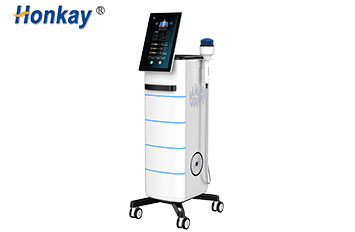
The four views above each answer a heat question. The rear view shows where air leaves the cabinet and how much clearance the fan needs; a unit pushed against a wall in a small room will not cool the way it did on a table in a showroom, and that is a siting problem you inherit. The side view shows whether the heads cool when idle or sit in a closed pouch and stay warm between clients. The back panel shows how many cables leave the cabinet and whether the mains inlet takes a standard lead you can replace locally.
Then the counter, the smallest check of the half hour and the one that causes the most quiet disagreement afterwards. Note the reading, run a number of pulses you can count in blocks of twenty, and read it again; the difference should match your count exactly. A drifting counter is not a catastrophe, but it means the number cannot schedule head changes. Then reset it, confirm zero, switch off at the mains, wait, and switch back on. A counter that returns to zero is a session counter; one that returns to its total is a lifetime counter and the reset was cosmetic.
Ask one more question while the display is in front of you: is the count kept per head, per channel or per machine? That answer decides how you keep records. A per-machine count shows how hard the platform has worked, which serves service intervals but not a replacement plan. A per-head count supports a replacement plan; if the software does not do it, your logbook must, and you want to know that before you design the logbook.
| Point to check | Normal at twenty minutes | What to write if not | What it means for the room |
|---|---|---|---|
| Housing at mid-body | Evenly warm, holdable bare | "Hot at mid-body" | Long lists need pauses the manual may not mention |
| Nose and contact face | Warm, no single hot spot | "Hot spot at the rim" | Contact technique and couplant need attention early |
| Cable behind the gland | Barely warmer than the rest | "Warm within a hand's width" | Confirm the cable is sold separately |
| Exhaust and fan | Steady air, speed settled | "Silent then loud at minute twelve" | Cabinet clearance becomes a siting requirement |
| Cradle and case | Cool, faint warmth only | "Warm through a glove" | Back-to-back bookings change the picture |
| Sound versus minute two | Same character, perhaps denser | "Flutter after fifteen minutes" | Ask for the duty cycle in writing |
One caution. Twenty minutes is a sample, not a verdict, and a unit cool for twenty minutes has not been proven cool for an hour. What the check gives you is a baseline: you now know what this handpiece sounds and feels like warm, so if the delivered unit behaves differently in its first week you will recognise it instead of wondering whether you imagined it. Write the readings down with the time. "Warm" means nothing in six weeks; "warm at the nose, cool at the back, at minute twenty-two" means something.
Half an hour is a plan, not a limit, and a demo that reaches this point at minute twenty-eight has usually run over. That is fine, provided the sample case comes before the sales conversation rather than after it. Once the case study is on the table the room starts talking about volume and the unit stops being the subject.
Ask the rep to run a session on a volunteer — a member of staff, or the rep's own forearm, which is what usually happens and is adequate here. Name the body area your room meets most often, because a demonstration on a large flat surface is easy and tells you little. Then watch the hands rather than the machine. Where does the free hand go: holding the cable clear, steadying the client, or doing nothing? How often does the operator look at the screen? Does the head stay flat through a curve or ride on one edge? Is gel topped up during the run or only at the start? Each is a small operational fact that will be true of your staff too.
Count the setup and the pack-down, because that is where the hidden minutes are. Time from closed case to running unit, and from stopped unit back to closed case. Add the two and multiply by sessions per day: the answer is the real cost of the platform in staff time, and it is often larger than the price difference between two candidates. A unit that takes four minutes to set up and two to pack away gives away six minutes per session, every session, for years.
Ask the operator, not the salesperson, the questions that matter: what do you check before the first client, what goes wrong most often, what do you do when it does, how long does a part take to arrive. Where the answer is "I would have to check", ask for it in writing and note that you asked.
Then the paperwork, which is the part of the demo that survives the demo. Ask for it while the unit is still on the table, because a request made in the room has a deadline and a request made by email two days later can be deferred indefinitely. You do not need another brochure. You need the operating documents. Where the platform carries a 24-month warranty from the factory shipment date, ask what starts that clock, what the buyer must do to keep it valid, and whether a worn head or a cut cable sits inside or outside the term.
| Ask for before you leave | Why it matters afterwards | A complete version contains |
|---|---|---|
| Packing list for the unit on the table | The only document that settles what was in the box | Every line item with quantity, cables, inserts, gel, tools, fuses, manual |
| Manual in your operators' language | Without it, training lives in one person's head | Setup, daily checks, cleaning, head change, fault list, duty cycle, storage |
| Priced spare-parts list | It tells you what ownership costs | Handpiece, cable, inserts, membranes, cradle, filter, price and lead time each |
| Warranty terms in full | The summary in the quotation is never the document | Cover, start date, exclusions, claim route, how a worn part is treated |
| Parts diagram | It decides whether a local technician can help | Assembly views whose numbers match the parts list line for line |
| A named service contact | A general address is a queue; a person is an answer | Name, direct address, hours covered, language of reply |
| Written accessory statement | "Standard accessories" is the phrase that causes the argument | A list with quantities, cross-referenced to the packing list |
| Your own signed note of readings | It is the only record of how the demo unit behaved | Time, settings, sound reading, heat notes, counter, who was present |
Thirty minutes of hands-on time is a sensible minimum, and it needs one continuous run of at least twenty minutes if you want any information about heat. A useful visit runs to about an hour once the sample case and the paperwork are added, and that hour is worth protecting rather than compressing. Fifteen minutes at a trade stand is an introduction; book a separate session with a unit that can be run properly.
Bring both. Gloves change how every control feels, and your own couplant shows how the handpiece behaves with the product you will actually use rather than the one in the demo kit. It also removes a variable: if two candidates are demonstrated with two different gels, the difference you feel may be the gel. A small tub in a bag is the cheapest test equipment in this routine.
Not by itself. Every platform in this class makes a percussive sound, and loud is not automatically bad. What matters is consistency: the same shape at every step of the ladder, unchanged after twenty minutes, with no secondary rattle or hiss under the pulse. A consistent loud unit your rooms can live with is workable. A quiet unit that develops a flutter at minute fifteen is not, and you only find that out by running it long enough.
How much work has gone through the platform or the head, depending on how the software is written, and only if you have confirmed it moves one count per pulse and can be reset. It is a bookkeeping tool, not a condition monitor: a high count on a maintained unit matters less than a low count on one that has been dropped. Use it to plan replacements and to compare the delivered unit with the demo unit.
The practical test is your hand: if you cannot rest bare fingers on the housing for several seconds, it is hotter than an operator will want against a palm for a full list. Then look at where the heat is. Even warmth is normal; a hot spot at the nose, a warm patch at the gland or a cradle warm through a glove each point at a different cause. Record location as well as intensity.
Yes, and it is reasonable when the platform is expensive or the first unit has clearly been travelled hard. A second session, ideally on a unit in service rather than in a case, shows whether the behaviour is characteristic or particular. If a second unit cannot be produced but two clinics running it daily can, that is an acceptable substitute — provided you may telephone them yourself rather than read a written reference.
The cable. Buyers check the handpiece, the screen and the price, then discover in month three that the cable is a permanent part of the housing rather than a replaceable item, or that a replacement takes weeks. Follow it from gland to connector with your hand, ask what it costs, how it is replaced and who does it. A platform with a cheap, stocked, user-replaceable cable is a different proposition from one where a broken conductor means shipping the handpiece back.
The equipment described on this page is made and supplied by Honkay, the brand of Guangzhou Huang-Kai Technology Co., Ltd., an OEM and ODM manufacturer of physiotherapy equipment working from Guangzhou, China. Our factory and offices cover more than 1,000 square metres, and we run an in-house research and development team alongside the production floor.
Because the platform, the handpieces and the accessories are built together rather than assembled from separate suppliers, the questions on this checklist can be answered at the order stage rather than after it: the number and profile of the heads in the set, the cable supplied with each, the cradle and the case, the couplant supplied alongside, and the manual language for the people who will operate it. Buyers who sell under their own badge order the same platform under private label, and the part numbers travel with the order so a repeat can be matched to the original run.
Honkay exports to South America, South Asia, South-East Asia, Western Europe, Northern Europe, Southern Europe, Eastern Europe, Oceania and North America, so most of the questions behind this page have already been asked by buyers working in those markets. More background is on our about page, and the checklist above can go straight to the team before a demo is booked.
Honkay supplies professional wellness and physiotherapy equipment to clinics and distributors. The information on this page is product and purchasing guidance, not medical advice. This device is intended for adjunctive use alongside professional care, not as a replacement for diagnosis or treatment. For any specific condition, consult a qualified clinician; individual experience varies.


 English
 中文